www.Giftcardmall.com/Mygift™: Check balance – Activate Visa
Note: The Giftcardmall/mygift login page has moved! If you have been gifted a Visa gift card in 2024, 2025 or 2026, then this applies to you. The old Giftcardmall.com website is no longer active. It will re-direct users to the new website at Giftcards.com. Don’t worry. It is just a re-branding. Your gift card still works. Follow the directions on this help page to check your Visa gift card balance and activate your card.
Update July 2026: The www.giftcardmall.com/mygift and mygift.giftcardmall.com website URLs no longer work. This is a very unhelpful decision by Giftcardmall, since many older Visa gift cards will still have Visit www.giftcardmall.com/mygift on them.
The same applies to mastercard gift cards: The www.giftcardmall.com/mcgift and www.mcgift.giftcardmall.com URLs no longer work either.
Instead, we advice you to visit https://www.giftcards.com/us/en/self-serve/check-balance to check your Visa and Mastercard gift balance.
Giftcardmall/Mygift: Login, Card Activation and Balance Check (www.Giftcardmall.com/Mygift).
On this page: Everything you need to know about the www.giftcardmall.com/mygift website:
- What happened to Giftcardmall.com?
- Giftcardmall/mygift Login and Sign Up.
- Checking your Giftcardmall Balance at www.Giftcardmall.com/Mygift
- Activate a Giftcardmall Visa Card.
- Order a Mygiftcard Visa gift card
- Contact Giftcardmall Customer Service.
- Report a lost or stolen Visa card.
For prepaid Mastercard cards, visit:
Mygift.Giftcardmall.com Check Balance
What Happened to Giftcardmall.com?
As per 1st of January 2025, the www.Giftcardmall.com website is no longer active. It will re-direct users to the new website at Giftcards.com. Don’t worry. It is just a re-branding. Your Visa gift card still works. Follow the directions on this help page to activate your Visa card and check your balance.
Note: Many gift cards and packaging, sold in 2024, still refers to the old website at Giftcardmall.com. For this reason, the company behind Giftcardmall.com and Giftcards.com have kept two original sub-domain pages active for a period to onboard card holders with a gift card sold in 2023 or 2024.
If your Visa gift card says ‘Visit www.giftcardmall.com/mygift’ or ‘Visit Mygift.giftcardmall.com’ on the back of the card or in the packaging, you can still access your balance and account at giftcardmall.com. It will redirect to giftcards.com.
What is Giftcardmall.com?
Giftcardmall.com was a website that sells gift cards from a variety of retailers. They offer a wide selection of gift cards, including both physical and electronic gift cards. Giftcardmall.com also offers a variety of discounts and promotions on gift cards.
Generally, is a great place to buy gift cards for your friend or family, or as a company bonus. They offer a wide selection of gift cards, discounts, and promotions. Giftcardmall.com gift cards are also easy to activate and checking the Giftcardmall balance on a card is straightforward.
The www.Giftcardmall.com domain now re-directs users to www.Giftcards.com.
How do I Activate my Giftcardmall card?
To activate your Giftcardmall card, you can either:
- Call 1-866-357-7391.
- Visit the https://mygift.giftcardmall.com/ website and click on the “Register Card” tab.
- Enter the 16-digit card number and the security code from the back of your card.
- Alternatively, visit the new Giftcardmall Activation page at https://www.giftcards.com/us/en/self-serve/activate-giftcard.
www.Giftcardmall.com/mygift Check Balance – This is How to Check Card Balances.
There are a few ways to check your Giftcardmall.com balance on a Visa card:
- Call 1-866-357-7391.
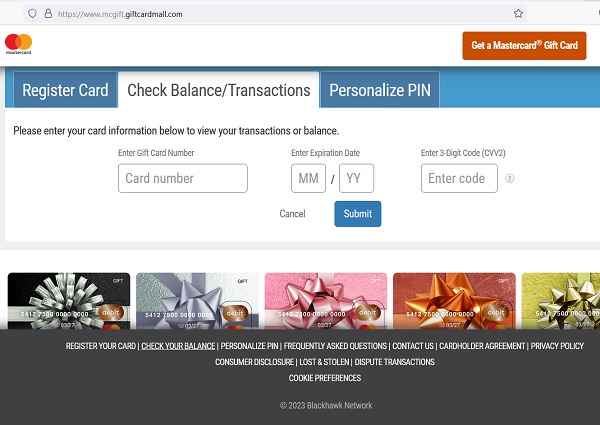
- Go to the https://mygift.giftcardmall.com website and click on the Check Balance Tab.
- You will be directed to https://mygift.giftcardmall.com.
- Enter the 16-digit card number and the security code from the back of your card.
- Alternatively, visit the new Giftcardmall Balance Check page at https://www.giftcards.com/us/en/self-serve/check-balance.
For Store Cards, view your store card balance by visiting the company website or by calling the number on the back of your card.
www.mygift.giftcardmall.com (Giftcardmall/Mygift) is Not Working.
We have received numerous reports that the https://mygift.giftcardmall.com/ website used for gift card balance checks is often not working properly. Infact, the Giftcardmall.com homepage is now re-directing to www.giftcards.com.
- If the Mygift.giftcardmall.com website is not working for you, first try at a later time or try with a different browser of device, or register/sign up for a Giftcardmall account first.
- If you have a prepaid Mastercard form Giftcardmall.com, then try this page instead https://mcgift.giftcardmall.com and click on ‘Check Balance’ to check your Giftcardmall balance. So, simply replace Mygift with Mcgift in theURL address.
- You can check if the page is down here: https://www.isitdownrightnow.com/mygift.giftcardmall.com.html.
- If the Mygift.giftcardmall.com is down or not working, then try the new Giftcards.com Balance Check page at https://www.giftcards.com/us/en/self-serve/check-balance.
Advantages of Giftcardmall Visa Cards.
- Giftcardmall.com does not charge any fees to activate or use their gift cards.
- Giftcardmall.com gift cards never expire.
- Giftcardmall.com gift cards can be used at any of the retailers listed on their website.
Tips for using Giftcardmall.com:
- When you are buying a gift card, be sure to check the expiration date.
- If you are buying a gift card for someone else, be sure to include a personalized message.
- If you are buying a gift card for yourself, be sure to keep the activation code in a safe place.
- If you are having trouble activating your gift card, you can contact Giftcardmall.com customer service for assistance.
How do I Activate a Giftcardmall Card?
There are two ways to activate a Giftcardmall card:
1. Giftcardmall Card Activation By phone:
Call 1-866-357-7391.
Follow the prompts to activate your card.
You will need to provide the 16-digit card number and the security code from the back of your card.
2. Giftcardmall Card Activation Online:
- Go to the https://www.giftcards.com/us/en/self-serve/check-balance website.
- Click on the “Register Card” tab.
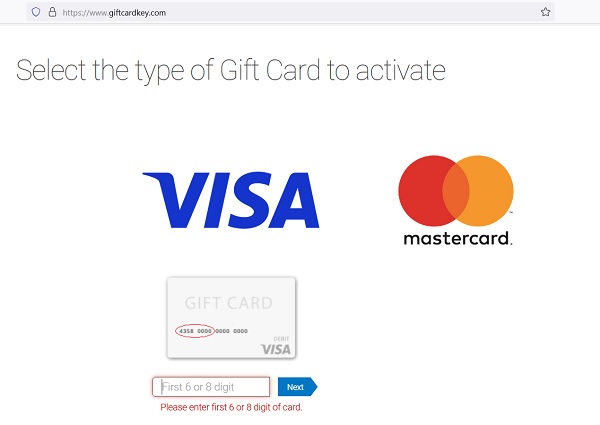
- Choose Visa or Mastercard.
- Enter the first 6 to 8 digitis of your 16-digit card number, then the remaining numbers and the security code from the back of your card.
- Click on the “Activate Card” button.
- Once your card is activated, you can start using it right away.
Alternatively, visit the new Giftcardmall Visa Card Activation page at https://www.giftcards.com/us/en/self-serve/activate-giftcard.
Here are some additional tips for activating your Giftcardmall card:
Make sure you have the 16-digit card number and the security code from the back of your card.
If you are activating your card online, make sure you are on the official www.Giftcardmall.com or www.giftcardkey.com website.
If you are having trouble activating your card, you can contact Giftcardmall customer service for assistance.
How do I register for a Giftcardmall account?
Here are the steps on how to register for a Giftcardmall account:
- Go to the Giftcardmall.com website. You will be re-directed to https://www.giftcards.com/us/en/member/sign-up.
- Click on the “Register” button.
- Enter your email address and a password.
- Create a username.
- Enter your first name and last name.
- Select your gender.
- Enter your date of birth.
- Select your country.
- Click on the “Create Account” button.
- Once you have created your account, you will be able to log in and start shopping for gift cards.
Here are some additional tips for registering for a Giftcardmall.com account:
- Make sure you use a valid email address.
- Choose a strong password that you will not forget.
- Enter your full name and date of birth accurately.
- Select your country correctly.
How do I log in to my Giftcardmall account?
Here are the steps on how to log in to your Giftcardmall account:
- Go to the Giftcardmall.com website. You will be re-directed to www.giftcards.com.
- Click on the “Sign In” button.
- Enter your email address and password.
- Click on the “Log In” button.
- If you have forgotten your password, you can click on the “Forgot Password?” link and follow the instructions to reset your password.
When logging in to your Giftcardmall.com account, keep this in mind:
- Make sure you are using the correct email address and password.
- If you are having trouble logging in, you can try clearing your browser’s cache and cookies.
- If you are still having trouble logging in, you can contact Giftcardmall customer service for assistance.
- Note, that Giftcardmall.com homepage does not exist anymore. Don’t be alarmed that the website re-directs users to their new page at www.giftcards.com.
Giftcardmall/Mygift Contacts.
How do I contact Giftcardmall Cusromer Service?
These are the different ways to contact Giftcardmall customer service:
Phone: 1-877-GC-MALL1 (1-877-426-2551) during support team hours.
Support Hours are 6:00AM to 9:00PM, Pacific Time, Monday-Sunday.
Email: Fill out the email form at https://www.giftcardmall.com/contact-us.
To wite to Giftcardmall, write to:
Blackhawk Network
ATTN: Customer Service
10615 Professional Circle Ste. 102
Reno, NV 89521
If you are having trouble contacting Giftcardmall customer service, you can try the following:
Check the www.Giftcardmall.com website to see if there are any known outages or delays.
Try contacting customer service during different hours of the day.
Note: The GiftCardMall/MyGift login page has moved. If you have been gifted a Visa gift card in 2024, 2025 or 2026, then this applies to you. The old GiftCardMall.com website is no longer active. It will redirect users to the new website at GiftCards.com. Do not worry — it is just a rebranding. Your gift card still works. Follow the directions on this help page to check your Visa gift card balance and activate your card.
The following URLs no longer work for balance check or card activation:
- www.giftcardmall.com/mygift
- mygift.giftcardmall.com
- www.giftcardmall.com/mcgift
- www.mcgift.giftcardmall.com
This is an unhelpful decision by GiftCardMall, as many older Visa and Mastercard gift cards still have the old URLs printed on them. Instead, visit the GiftCards.com self-serve balance check page (search for “GiftCards.com check balance”), or use the MyGift help page for step-by-step guidance.
GiftCardMall MyGift — Frequently Asked Questions
Everything you need to know about GiftCardMall Visa and Mastercard gift cards, including balance checks, activation, fees, and what to do now that the old URLs have stopped working.
Where do I check my GiftCardMall Visa gift card balance in 2026?
You can check your GiftCardMall Visa gift card balance by visiting the GiftCards.com self-serve portal — search for “GiftCards.com check balance” to find the current page — or by calling the number printed on the back of your card. For a full step-by-step walkthrough of the balance check process, including what to do if your card details are not recognized, visit the MyGift help page which is updated regularly to reflect the latest URL changes.
Why is giftcardmall.com/mygift not working in 2026?
The URL www.giftcardmall.com/mygift stopped working for balance checks and card activation in July 2026, when GiftCardMall fully completed its transition to GiftCards.com and deactivated its old self-service portal pages. This is frustrating for cardholders because millions of physical Visa and Mastercard gift cards still have the old website address printed directly on the card. Your card is still valid and fully functional — only the management URL has changed. Visit the MyGift help page for current instructions on how to check your balance and activate your card through the new system.
What happened to mcgift.giftcardmall.com for Mastercard gift cards?
The URLs www.mcgift.giftcardmall.com and www.giftcardmall.com/mcgift no longer work for Mastercard gift card management as of July 2026, for the same reason the Visa MyGift portal was deactivated — GiftCardMall has fully migrated to GiftCards.com. Mastercard gift cardholders should now use the GiftCards.com self-serve balance check page to view their balance and manage their card, or call the phone number printed on the back of their card. Detailed guidance for both Visa and Mastercard cards is available on the MyGift help page.
My card still says “visit www.giftcardmall.com/mygift” — what do I do?
If your physical Visa or Mastercard gift card has the old giftcardmall.com/mygift or mcgift.giftcardmall.com address printed on it, ignore that URL and go to GiftCards.com instead — search for “GiftCards.com self-serve check balance” to find the correct current page. The old address printed on your card is outdated but your card itself remains completely valid. You can also call the toll-free number printed on the back of the card to check your balance by phone without needing the website at all. The MyGift help page has step-by-step guidance for this exact situation.
How do I activate my GiftCardMall Visa gift card?
You activate a GiftCardMall Visa gift card by visiting the GiftCards.com self-serve portal and entering your 16-digit card number, expiration date, CVV security code, and ZIP code. Some cards activate automatically upon first use, while others require this explicit activation step before any purchase will be approved. If your card is not activating online, call the customer service number on the back of the card for assisted activation. Full instructions are available on the MyGift help page.
How do I register my GiftCardMall Visa gift card for online shopping?
To use your GiftCardMall Visa gift card for online purchases, you must register a billing name and address through the GiftCards.com self-serve portal, because most e-commerce merchants require a billing address that matches the card on file. Without registration, your online transactions will likely be declined even when you have sufficient balance on the card. Once registered, use exactly the same name and address you entered during registration as the billing information at checkout. Detailed registration steps are available on the MyGift help page.
What is a GiftCardMall Visa gift card?
A GiftCardMall Visa gift card is a prepaid payment card that works anywhere Visa debit cards are accepted in the United States, including retail stores, restaurants, and most online merchants. Unlike store-specific gift cards, Visa prepaid cards from GiftCardMall are not tied to any single retailer, giving recipients complete flexibility to spend the balance wherever they choose. They are widely used as personal gifts, employee incentives, and corporate rewards. The cards are issued by Blackhawk Network and managed through the MyGift portal.
What is GiftCardMall and what happened to the website?
GiftCardMall was an online platform operated by Blackhawk Network where consumers could purchase prepaid Visa and Mastercard gift cards, as well as store-branded gift cards from hundreds of retailers. In April 2024, GiftCardMall officially rebranded and moved all new purchases to GiftCards.com, with the old GiftCardMall.com domain now redirecting automatically to the new site. Existing cards issued under the GiftCardMall brand remain fully valid. For help managing your existing GiftCardMall card, see the MyGift help page.
What is an eGift card from GiftCardMall?
An eGift card is a digital gift card delivered by email rather than shipped as a physical card, making it ideal for last-minute gifts or sending to someone in a different location. GiftCardMall eGift cards are typically delivered within minutes of purchase, though in some cases delivery can take up to 24 hours depending on the retailer. The recipient receives an email with their gift card number and PIN, which can be used for online shopping immediately. Unlike physical Visa prepaid cards, most eGift cards are store-specific and managed through the individual retailer’s website rather than the MyGift portal.
How do I purchase an eGift card from GiftCardMall?
You can now purchase eGift cards through GiftCards.com, the platform that replaced GiftCardMall.com after the April 2024 rebrand. Simply select the retailer whose gift card you want to send, choose the card amount, enter the recipient’s email address and a personal message, and complete the payment. The eGift card is then sent directly to the recipient’s inbox within minutes. GiftCards.com accepts payment by credit card, debit card, and most major digital wallets.
How do I redeem an eGift card received from GiftCardMall?
To redeem an eGift card, open the email you received and click the redemption link, then enter the gift card number and PIN at the retailer’s website or present the barcode in-store at the register. Most eGift cards can be added to digital wallets or retailer apps for convenience. Keep the original email in a safe place until the full balance is spent, as you will need the card number and PIN to check your balance or resolve any issues. If you have not received your eGift card within 24 hours of purchase, check your spam folder before contacting customer service.
Where can I use my GiftCardMall Visa gift card?
Your GiftCardMall Visa gift card is accepted at any US merchant that accepts Visa debit cards, including grocery stores, restaurants, clothing retailers, gas stations, hotels, and most online stores. According to Visa, the card is accepted at over 80 million merchant locations worldwide. The card cannot be used at ATMs to withdraw cash, and some merchants such as car rental companies and hotels may place a temporary authorization hold that temporarily reduces your available balance. For more on where and how to use your card, visit the MyGift help page or see Visa’s official guidance at usa.visa.com.
How do I get a PIN for my GiftCardMall Visa gift card?
You can set up a PIN for PIN-based debit purchases by visiting the GiftCards.com self-serve portal or calling the toll-free number on the back of your card and following the prompts. The PIN can only be used for purchases at PIN-enabled payment terminals and cannot be used to withdraw cash at ATMs or receive cash back during a purchase. If you forget your PIN or need to reset it, call the customer service number on your card. Step-by-step PIN setup instructions are also available on the MyGift help page.
What should I do if my GiftCardMall Visa gift card is declined?
A declined transaction on a GiftCardMall Visa gift card is most commonly caused by the card not being registered with a billing address, which is required by most online merchants and some physical retailers. Other common causes include insufficient balance, the card not yet being activated, a temporary hold placed by a gas station or hotel, or entering the CVV incorrectly too many times which temporarily locks the card. Check your balance and registration status through the GiftCards.com self-serve page, or get detailed troubleshooting help on the MyGift help page.
Can I split a payment using my Visa gift card?
Many retailers allow a split payment where you use your Visa gift card for part of the purchase and pay the remainder with a credit or debit card, but this feature is not universally supported and depends entirely on the merchant’s point-of-sale system. Before attempting a split payment in-store, check your current balance at the GiftCards.com self-serve page or through the MyGift help page, then tell the cashier the exact amount you want to charge to the gift card before they begin processing. Online stores rarely support split payments with a prepaid card, so it is best to use the card for purchases that do not exceed your available balance.
Do GiftCardMall Visa gift cards have fees?
GiftCardMall Visa prepaid gift cards may charge a monthly inactivity fee of approximately $4.95 per month after 12 consecutive months with no transactions on the card. This fee is deducted directly from your remaining balance each month until the balance is depleted, so it is important to use your card before the 12-month window expires. Some cards also carry a small purchase fee at the time of buying the card, but there are no monthly fees charged during active use. Review the cardholder agreement that came with your card for the specific fee schedule, and see the MyGift help page for tips on managing your balance.
Do GiftCardMall eGift cards expire or have fees?
GiftCardMall eGift cards do not have activation fees or monthly maintenance fees, but they do carry an expiration date which is stated in the gift card terms. Store-branded eGift cards are governed by the individual retailer’s terms and conditions, which can vary significantly, so always check the expiration date on the card itself. For prepaid Visa eGift cards issued by GiftCardMall, the same inactivity fee policy that applies to physical cards may also apply. Keep any eGift card emails until the full balance is used, as you will need the card details for balance checks.
How do I avoid the GiftCardMall inactivity fee?
The most effective way to avoid the inactivity fee is to use your card at least once every 12 months, even for a small purchase, which resets the inactivity clock. If you have a remaining balance you keep forgetting to use, consider adding the card to a digital wallet where it will be visible alongside your other payment methods as a reminder. Check your last transaction date by reviewing your transaction history on the GiftCards.com self-serve page or on the MyGift help page, and spend the remaining balance before fees begin.
What do I do if my GiftCardMall Visa gift card is lost or stolen?
If your GiftCardMall Visa gift card is lost or stolen, call the customer service number printed on the back of the card immediately — support is available 24 hours a day, 7 days a week — to report the card and request cancellation to protect your remaining balance. If funds remain on the account, a replacement card can be issued for a $5 fee, and you may be required to provide additional identifying information to verify ownership. This is why it is strongly recommended to register your card and take a photo of the front and back as soon as you receive it. The MyGift help page has the customer service contact details.
What if I lose my eGift card email?
If you have lost the email containing your eGift card, contact GiftCardMall customer service — now operating through GiftCards.com — and provide the gift card number and PIN if you have them recorded, and they can assist in recovering access to the card. For store-branded eGift cards, contact the specific retailer directly, as they have their own processes for recovering lost gift card details. Always search your email inbox and spam folder first, since eGift card emails are sometimes filtered automatically. Going forward, save eGift card emails to a dedicated folder or take a screenshot of the card details immediately upon receipt.
What if my GiftCardMall Visa gift card was already used when I received it?
If you received a physical Visa gift card that has already been used or has a lower balance than expected, this may be the result of packaging tampering — a known fraud method called card draining where thieves record card details in-store before a card is purchased. Contact GiftCardMall customer service through GiftCards.com immediately, and also report the issue to the store where the card was purchased. Always inspect the packaging of a physical gift card carefully before purchasing, and register the card through the MyGift help page as soon as possible to protect the balance.
How is a physical GiftCardMall gift card packaged and delivered?
Physical GiftCardMall gift cards are packaged in a gift box or card carrier and shipped via USPS, typically within 1 to 2 business days of your order being placed. Delivery time after shipping depends on your location, but most orders arrive within 3 to 7 business days. You can check the status of your order by logging into your account on GiftCards.com and viewing your order history, or by contacting customer service. Track your shipment with the tracking number provided in your order confirmation email.
Are retail gift cards from GiftCardMall refundable?
The refund policy for store-branded retail gift cards depends entirely on the individual retailer that issued the card, not on GiftCardMall or GiftCards.com. Some retailers allow refunds or exchanges of gift cards in limited circumstances, while others have a strict no-refund policy on gift cards of any type. For prepaid Visa and Mastercard gift cards issued by GiftCardMall, the cards are generally non-refundable once purchased and activated. Always check the terms and conditions specific to your card type before assuming a refund is possible.
Can I change the recipient of a GiftCardMall gift card after ordering?
In some cases you can change the recipient of a GiftCardMall gift card, but this depends on whether the order has already been processed and shipped or emailed. For eGift cards that have not yet been delivered, contact customer service through GiftCards.com as quickly as possible after placing the order — changes become significantly harder once the card email has been sent. For physical cards that have not yet shipped, contact customer service immediately. Once a card has been sent to a recipient, the change may not be possible.
What is the GiftCardMall Visa 5Back Rewards Program?
The Visa 5Back Program was a rewards promotion offered by GiftCardMall that allowed cardholders to earn 5 percent cash back on purchases made with a qualifying Visa gift card purchased through GiftCardMall. To participate, you had to purchase a qualifying Visa gift card, activate it, and register for the program through the GiftCardMall website. Cash back was credited to your account within 45 days of qualifying purchases, up to a maximum of $250 per year. The program was limited to purchases made within the United States and excluded certain merchant categories including gas stations and liquor stores. Check the current GiftCards.com website for any updated rewards programs, as promotions change after the rebrand.
How do I redeem cash back earned through the GiftCardMall rewards program?
Cash back earned through GiftCardMall’s rewards promotions was redeemable for a gift card to any retailer available on the GiftCardMall platform, or in some cases as a check or PayPal payment. With GiftCardMall’s transition to GiftCards.com, any unredeemed rewards balances or questions about past rewards should be directed to customer service through GiftCards.com. Contact the customer service team with your account information and details of the promotional period your rewards were earned under, as the new platform team can access historical account records from the old GiftCardMall system.
How do I contact GiftCardMall customer service in 2026?
GiftCardMall customer service is now handled through GiftCards.com following the 2024 rebrand, and you can reach support through the GiftCards.com website’s help center or by calling the phone number printed on the back of your specific card. For Visa prepaid cards the number is typically 888-524-1283 and for Mastercard prepaid cards it is typically 877-322-4711, though the exact number varies by card program so always use the number on your card. Additional guidance on reaching customer service is available on the MyGift help page.
What are common problems customers report with GiftCardMall gift cards?
Common issues reported by GiftCardMall customers include receiving cards that were not properly activated, cards being declined online because the billing address had not been registered, cards that show a zero balance due to card draining fraud before purchase, and difficulty navigating customer service after the transition to GiftCards.com. The URL changes in July 2026 created additional confusion for many customers who still had old website addresses on their physical cards. For solutions to the most frequently reported problems, including step-by-step troubleshooting for declines and balance discrepancies, visit the MyGift help page.
Are retail gift cards from GiftCardMall embossed?
Some retail store gift cards sold through GiftCardMall are embossed with raised lettering, while others are printed flat — this varies entirely by the individual retailer whose gift card was purchased. Prepaid Visa and Mastercard gift cards issued by GiftCardMall are typically not embossed and instead have their card number printed or digitally encoded on the card. Embossing has no effect on whether the card works or on its value. The functional information to look for on any gift card is the 16-digit card number, expiration date, and CVV or PIN, which are present on all cards regardless of whether they are embossed.